You can now disconnect a coding agent, live
· MCP · Security · Coding agents · Privacy
By Alain Cyr, Founder, Koesion
What's new
Settings now has a Connected agents section. It lists every coding agent that has read your catalog through the MCP server, with when it first connected and when it was last used.
Next to each agent is a Disconnect button. Click it and the agent's next call is refused, on every device where it's signed in. Allow again lets it back in.

Why revoking was harder than it sounds
Coding agents sign in to the MCP server through Clerk with OAuth. Three things about that setup meant we couldn't just add a "revoke" button:
- Access tokens are JWTs. Once a JWT is issued, it stays valid until it expires, and nobody can recall it.
- Refresh tokens don't expire. When an access token runs out, the agent quietly gets a new one.
- Agents identify themselves with a client ID metadata document: a public URL that everyone using the same agent shares. There is no per-user app registration to delete.
On top of that, Clerk has no API that lists the apps a user has authorized. We couldn't ask Clerk which agents you had connected, and we couldn't ask it to forget one.
How it works now
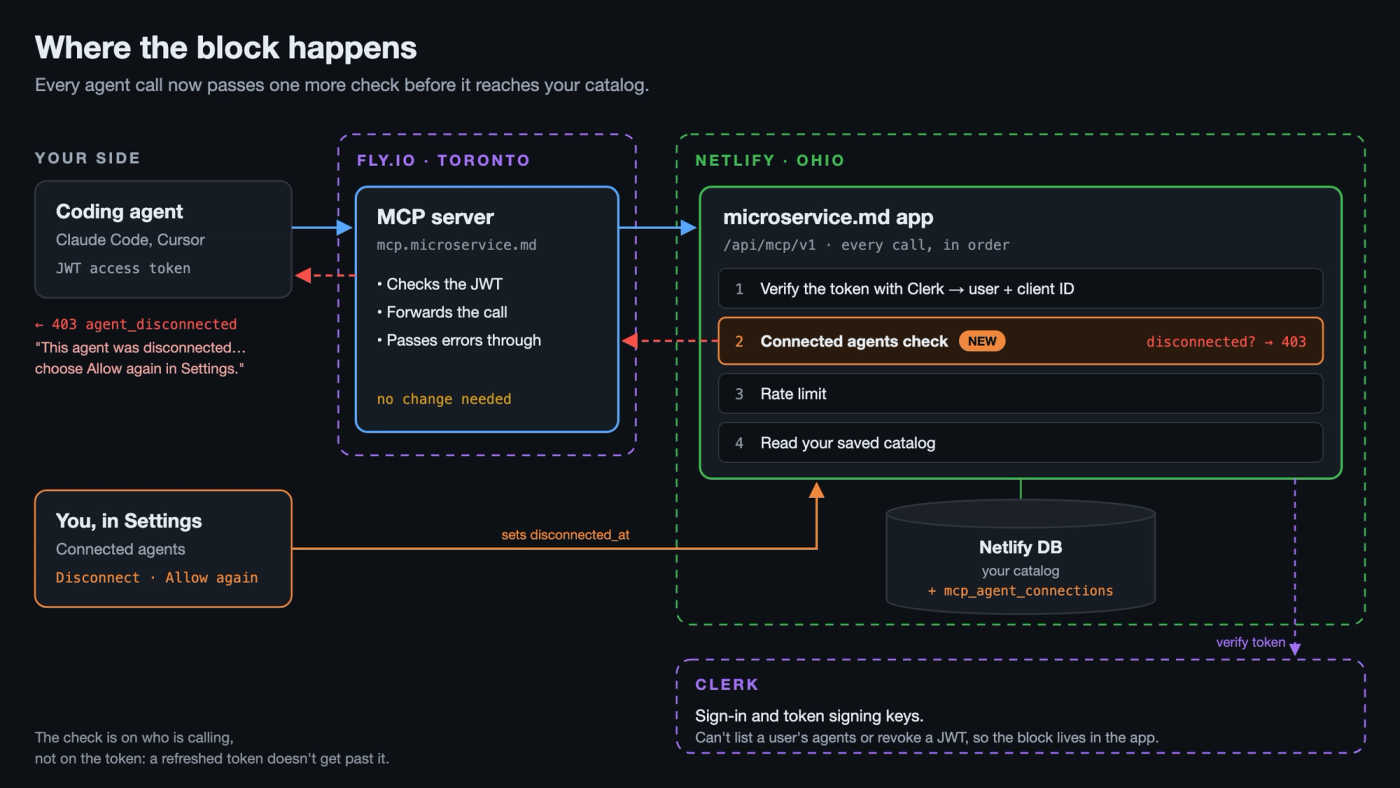
Every MCP call already passes through our API before it touches your catalog. The Rust server on Fly.io forwards the agent's token, and the app verifies it with Clerk. That check tells us two things: who you are, and which client sent the call.
We now record that pair, with when the agent first and last connected. Disconnect sets a flag on it, and the API checks the flag on every call. A valid token doesn't get past it, and neither does a fresh one from a refresh, because the check is on who is calling, not on the token.
A disconnected agent gets a plain error it can show you: it was disconnected, and you can allow it again in Settings. The MCP server needed no change for this. It already passes our error messages to the agent word for word.
Why not opaque tokens?
Clerk can also issue opaque access tokens instead of JWTs, and those can be revoked: Clerk's revoke endpoint cancels the access token and the refresh token behind it. We looked at switching, and decided against it.
- To revoke a grant, you have to hand Clerk one of its tokens. Only the agent has them, so we would have had to store every agent's latest token. A table of live bearer tokens is exactly what we don't want to hold, and our privacy policy says we don't.
- Opaque tokens aren't bound to our server. A JWT carries an audience claim, and our MCP server refuses any token that wasn't issued for mcp.microservice.md. Clerk's check for opaque tokens returns no audience, so we would lose that protection.
- Every call would cost a round trip to Clerk. A JWT is checked locally against Clerk's published signing keys. An opaque token has to be sent to Clerk to be verified.
- It still wouldn't give you a list. Clerk has no API for the agents a user has authorized, so we would need our own record of connected agents anyway. Once that record exists, blocking on it does the job without touching tokens at all.
Trade-offs
- Disconnecting works per agent, not per device. If every Claude Code install shares one client ID, disconnecting it stops it on your laptop and your desktop alike.
- Allow again lets back in every device where the agent is still signed in. To retire an old machine for good, remove the server from the agent there too.
- API keys for CI are separate. Delete them under API keys on the same Settings page.
What we store
For each connected agent we keep its client ID, when it first and last connected, and whether you've disconnected it. No tokens. The privacy policy now describes this, along with what the MCP server and our API log for each call.